
How to set up the programming of an automatic commercial coffee machine?
Leave a message

As a supplier of automatic commercial coffee machines, I've had the privilege of witnessing the transformative power of these machines in various business settings. From bustling cafes to corporate offices, the demand for high-quality, efficient coffee solutions is on the rise. In this blog post, I'll share some insights on how to set up the programming of an automatic commercial coffee machine, ensuring that you can offer your customers the perfect cup of coffee every time.
Understanding the Basics of Programming
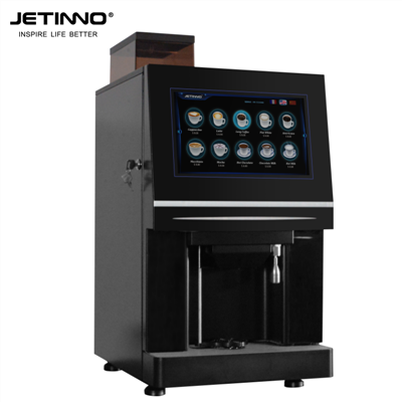
Before diving into the programming process, it's essential to understand the basic components and functions of an automatic commercial coffee machine. Most machines come with a control panel that allows you to adjust various settings, such as the amount of coffee, water, and milk, as well as the brewing time and temperature. Some machines also offer advanced features, such as programmable recipes, automatic cleaning cycles, and remote monitoring capabilities.
To get started, familiarize yourself with the user manual that comes with your coffee machine. The manual will provide detailed instructions on how to operate the machine, including how to access the programming menu and make adjustments to the settings. If you have any questions or need further assistance, don't hesitate to contact the manufacturer's customer support team.
Step-by-Step Guide to Programming
Once you have a basic understanding of the machine's functions, you can start programming it to meet your specific needs. Here's a step-by-step guide to help you get started:
Step 1: Power On the Machine
Before you can start programming the machine, make sure it is properly connected to a power source and turned on. Allow the machine to warm up for a few minutes to ensure that it is ready to operate.
Step 2: Access the Programming Menu
Most automatic commercial coffee machines have a dedicated programming menu that can be accessed through the control panel. Look for a button or icon that says "Program" or "Settings" and press it to enter the programming mode.
Step 3: Select the Beverage Type
Once you are in the programming menu, you can select the type of beverage you want to program. This may include espresso, cappuccino, latte, or other coffee-based drinks. Some machines also allow you to program non-coffee beverages, such as tea or hot chocolate.
Step 4: Adjust the Settings
After selecting the beverage type, you can adjust the settings to customize the taste and strength of the drink. This may include adjusting the amount of coffee, water, and milk, as well as the brewing time and temperature. Some machines also allow you to adjust the foam level and the ratio of milk to coffee.
Step 5: Save the Program
Once you have adjusted the settings to your liking, you can save the program by pressing the "Save" or "Enter" button. The machine will then remember the settings for that particular beverage, allowing you to quickly and easily prepare it in the future.
Step 6: Test the Program
After saving the program, it's a good idea to test it to make sure it is working properly. Select the beverage type from the main menu and press the "Start" button to begin the brewing process. Observe the machine as it brews the drink and make any necessary adjustments to the settings if the taste or strength is not to your liking.
Tips for Programming Your Coffee Machine
Here are some tips to help you get the most out of your automatic commercial coffee machine programming:
- Experiment with Different Settings: Don't be afraid to experiment with different settings to find the perfect combination of taste and strength for your customers. Try adjusting the amount of coffee, water, and milk, as well as the brewing time and temperature, to see how it affects the flavor of the drink.
- Create Custom Recipes: Many automatic commercial coffee machines allow you to create custom recipes for your favorite beverages. This can be a great way to offer your customers a unique and personalized experience.
- Use the Machine's Advanced Features: Some machines offer advanced features, such as programmable recipes, automatic cleaning cycles, and remote monitoring capabilities. Take advantage of these features to make your coffee machine more efficient and user-friendly.
- Keep the Machine Clean: Regularly cleaning your coffee machine is essential to ensure that it is working properly and producing high-quality drinks. Follow the manufacturer's instructions for cleaning and maintenance to keep your machine in top condition.
Our Product Recommendations
As a supplier of automatic commercial coffee machines, we offer a wide range of products to meet the needs of different businesses. Here are some of our top recommendations:
- Espresso Coffee vending Machine coffee beverage machine 14inch: This machine is perfect for cafes and restaurants that want to offer a variety of espresso-based drinks. It features a large 14-inch touchscreen display, programmable recipes, and automatic cleaning cycles.
- Countertop Coffee Vending Machine Espresso machine 10 inch: This compact machine is ideal for small offices and businesses that want to offer a convenient and easy-to-use coffee solution. It features a 10-inch touchscreen display, programmable recipes, and a built-in grinder.
- JL60A Milk Steam Wand Commercial Espresso Coffee Machine: This machine is perfect for cafes and restaurants that want to offer a high-quality espresso and milk-based drinks. It features a powerful steam wand, programmable recipes, and automatic cleaning cycles.
- Table Top Tea Vending Machine Horeca Screen 14 inch: This machine is ideal for businesses that want to offer a variety of tea and other hot beverages. It features a large 14-inch touchscreen display, programmable recipes, and automatic cleaning cycles.
- Coffee Machine With Hot Water Dispenser JL18: This machine is perfect for cafes and restaurants that want to offer a high-quality bean-to-cup espresso. It features a built-in grinder, programmable recipes, and automatic cleaning cycles.
Conclusion
Setting up the programming of an automatic commercial coffee machine is a relatively simple process that can have a significant impact on the quality and efficiency of your coffee service. By following the steps outlined in this blog post and using the tips and recommendations provided, you can ensure that your coffee machine is programmed to meet the specific needs of your business and your customers.
If you have any questions or need further assistance with programming your coffee machine, or if you are interested in learning more about our products and services, please don't hesitate to contact us. We are here to help you find the perfect coffee solution for your business.

References
- Manufacturer's user manual for automatic commercial coffee machines
- Industry best practices for programming and operating coffee machines